Quick Start: Testing Gluten with the Bolt Backend
This guide provides a task-oriented walkthrough to quickly verify that the Gluten Bolt backend is working in spark-shell (local mode) and spark-submit (cluster mode), assuming you have a pre-built Gluten JAR.
1. Prerequisites (Quick Checklist)
Before you begin, ensure you have the following:
- Compatible Environment: Your build and runtime environment must meet Bolt’s requirements:
- OS: Linux
- Compiler: GCC 10, 11, or 12; or Clang 16
- Dependencies: Python 3 (with virtualenv or Conda) and Conan
- Kernel: Linux kernel > 5.4 is recommended to enable
io_uringfor better I/O performance.
- Gluten JAR with Bolt: A Gluten JAR file that has been successfully built with the Bolt backend. It should contain
libbolt_backend.so.
Note: This guide does not restate the full build process. If you need to build from scratch, please refer to the Gluten repository’s migration and build documents:
2. Locate and Verify the Gluten JAR
All tests depend on a Gluten JAR that includes the Bolt backend. This file is typically located in the output/ directory of your Gluten project.
Use the following command to find the JAR and set its path as an environment variable for convenience:
```bash linenums=”1”
Set the path to your Gluten project’s output directory
export GLUTEN_JAR=$(ls /path/to/your/gluten/output/gluten-spark*.jar | head -n 1)
Verify that the path is set correctly
echo “Found Gluten JAR at: ${GLUTEN_JAR}”
**How to confirm the JAR contains Bolt?**

If you are unsure whether your JAR was built for Bolt, run this command. If it outputs a line containing `libbolt_backend.so`, the JAR is correct.

```bash
unzip -l "${GLUTEN_JAR}" | grep libbolt_backend.so
3. Local spark-shell Smoke Test
Using spark-shell is the fastest way to verify that the Bolt backend is active on your local machine.
3.1. Startup Command Template
Launch a spark-shell session with Gluten and Bolt enabled. Make sure the GLUTEN_JAR and JAVA_HOME are set correctly.
# Ensure GLUTEN_JAR is set
if [ -z "${GLUTEN_JAR}" ]; then echo "Error: GLUTEN_JAR is not set." >&2; exit 1; fi

spark-shell \
  --master local[4] \
  --driver-memory 4G \
  --conf spark.plugins=org.apache.gluten.GlutenPlugin \
  --conf spark.memory.offHeap.enabled=true \
  --conf spark.memory.offHeap.size=10g \
  --conf spark.shuffle.manager=org.apache.spark.shuffle.sort.ColumnarShuffleManager \
  --conf spark.driver.extraClassPath=${GLUTEN_JAR} \
  --conf spark.executor.extraClassPath=${GLUTEN_JAR} \
  # For Java 11, set following two options
  --conf spark.driver.extraJavaOptions=-Dio.netty.tryReflectionSetAccessible=true \
  --conf spark.executor.extraJavaOptions=-Dio.netty.tryReflectionSetAccessible=true \
  --jars ${GLUTEN_JAR}
3.2. Sample Query and Validation
Once inside the spark-shell, run the following Scala code. It creates a small Parquet file and then reads, filters, and aggregates it.
-
Prepare Test Data (run in
spark-shell):import spark.implicits._ // Create a simple DataFrame val data = (1 to 1000).map(i => (i, s"name_$i", i % 10)) val df = spark.createDataFrame(data).toDF("id", "name", "category") // Save it as a Parquet file val parquetPath = "/tmp/bolt_quick_test.parquet" df.write.mode("overwrite").parquet(parquetPath) println(s"Test Parquet file written to: ${parquetPath}") -
Execute a Query and Check the Plan:
// Read the Parquet file val inputDF = spark.read.parquet(parquetPath) // Perform a filter and aggregation query val resultDF = inputDF .filter($"category" > 5) .groupBy("category") .count() // Print the execution plan resultDF.explain() // Show the results resultDF.show() -
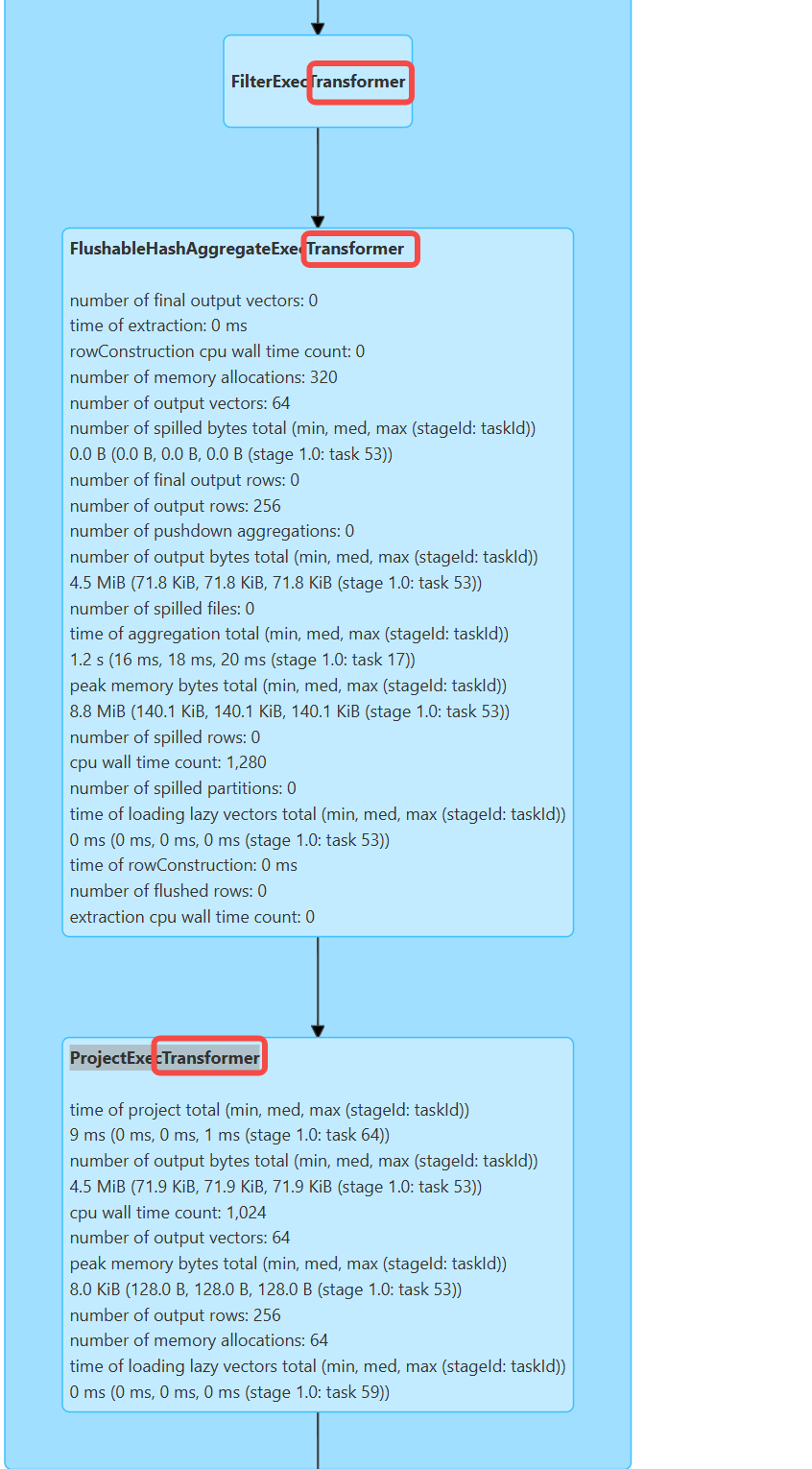
Verify Bolt is Active:
The key is to inspect Spark UI(ip:4040)
SQL/DataFrametab. If you see *Transformer, likeFilterExecTransformer,ProjectExecTransformer, it confirms that Gluten has offloaded the computation to the Bolt backend.