Apache Kudu has long provided client APIs in C++, Java, and Python for building client applications. Today, we’re excited to announce the introduction of a REST API for table DDL operations that makes Kudu even more accessible to developers and integration tools.
This feature is available in the master branch and will be released with Kudu 1.19.0.
Overview
The Apache Kudu REST API exposes table metadata and administrative operations over HTTP on top of Kudu’s system catalog. It lets users handle these tasks with lightweight REST calls instead of building a full client application that depends on the Kudu client library and uses KRPC to interact with Kudu clusters.
Key Features
- DDL Operations: Create, read, update, and delete tables through HTTP endpoints
- JSON-based: All requests and responses use JSON format for easy parsing
- RESTful Design: Follows standard HTTP methods and status codes
- Kerberos/SPNEGO Authentication: Integrates with Kudu’s existing authentication mechanisms
API Overview
The REST API is available on the master’s webserver at /api/v1/ and provides
endpoints for table DDL operations. The API supports standard HTTP methods
(GET, POST, PUT, DELETE) and returns JSON responses.
Available Endpoints
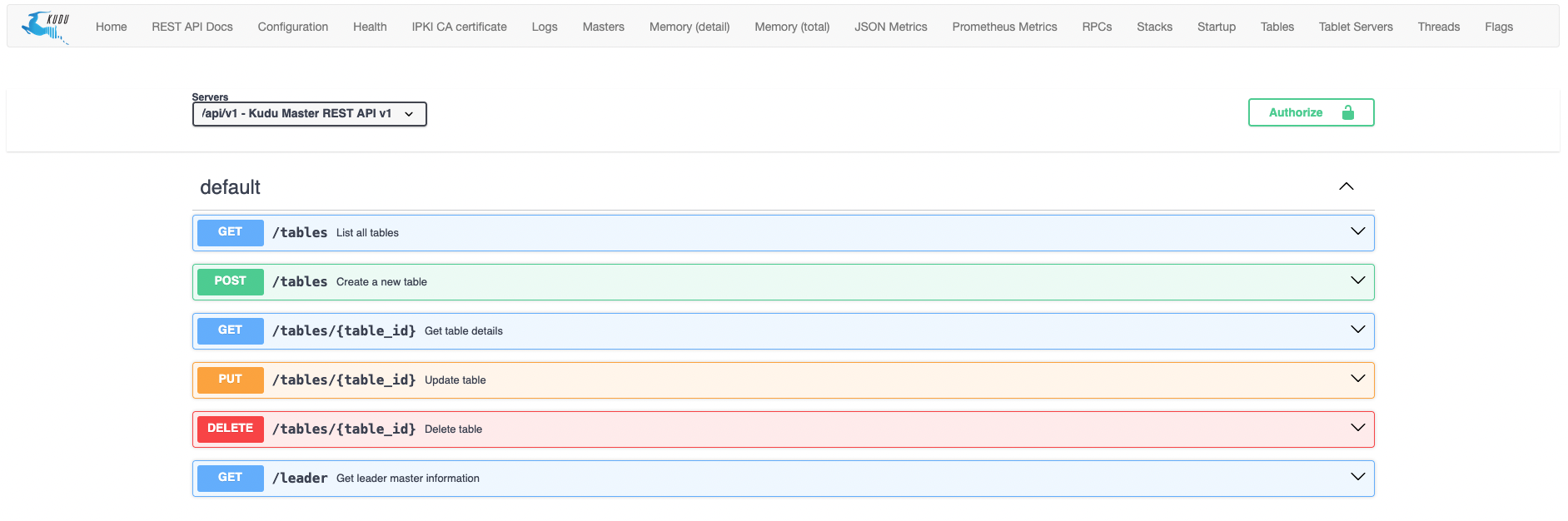
- GET
/api/v1/tables- List all tables - POST
/api/v1/tables- Create a new table - GET
/api/v1/tables/<table_id>- Get table details - PUT
/api/v1/tables/<table_id>- Update table metadata - DELETE
/api/v1/tables/<table_id>- Delete a table - GET
/api/v1/leader- Discover the current leader master
Example Request
GET /api/v1/tables/<table_id>
curl http://master-host:8051/api/v1/tables/a2810622a25b4a3e8ce0be3ece103c50
For secure clusters with Kerberos/SPNEGO authentication enabled, include
authentication flags in the curl command (e.g., --negotiate -u :).
Response:
{
  "name": "example_table",
  "id": "a2810622a25b4a3e8ce0be3ece103c50",
  "schema": {
    "columns": [
      {
        "id": 10,
        "name": "column_name",
        "type": "INT8",
        "is_key": true,
        "is_nullable": false,
        "encoding": "AUTO_ENCODING",
        "compression": "DEFAULT_COMPRESSION",
        "cfile_block_size": 0,
        "immutable": false
      }
    ]
  },
  "partition_schema": {
    "hash_schema": [
      {
        "columns": [
          {
            "id": 10
          }
        ],
        "num_buckets": 2,
        "seed": 0
      }
    ],
    "range_schema": {
      "columns": [
        {
          "id": 10
        }
      ]
    }
  },
  "owner": "default",
  "comment": "",
  "extra_config": {}
}
For complete API documentation, the OpenAPI specification is available in the
Kudu repository.
On a Kudu cluster running this feature, the API documentation is accessible at
http://master-host:8051/api/docs:
Limitations
Multi-Master Setup
In multi-master Kudu clusters, only the leader master will successfully process
REST API requests. Non-leader masters will respond with an HTTP 503 (Service
Unavailable) error. Since the leader master can change at any time due to
failures or cluster reconfigurations, applications should handle 503 errors by
querying the /api/v1/leader endpoint to discover the current leader and
retrying the request against the new leader master’s address.
Metadata Only
This REST API focuses exclusively on table DDL operations. Data read/write operations are not supported through this interface and should continue to use Kudu’s native client APIs.
Configuration
The REST API must be explicitly enabled using the --enable_rest_api flag on
Kudu masters. The master’s webserver must also be enabled (via the
--webserver_enabled flag) since the REST API is served through the webserver.
References
- OpenAPI Specification: https://swagger.io/specification/
- Kudu REST API OpenAPI specification: https://github.com/apache/kudu/blob/master/www/swagger/kudu-api.json
- Kudu C++ Client API documentation: https://kudu.apache.org/cpp-client-api/index.html
- Kudu Java Client API documentation: https://kudu.apache.org/apidocs/index.html